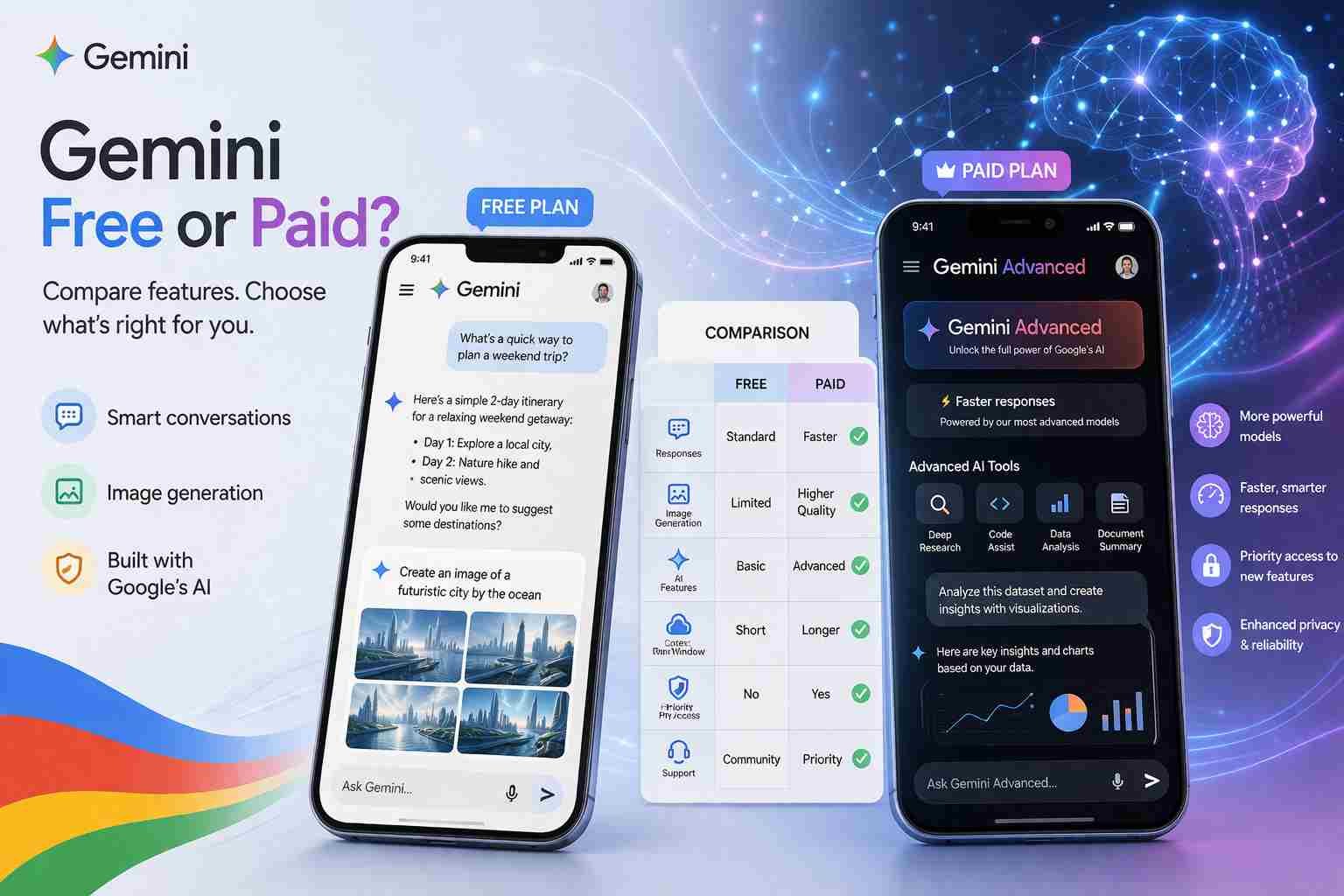
Is Google Gemini AI Free or Paid?
Let me answer this straight so you don’t waste time: Google Gemini AI is free to use, but it also has a paid version.
Most people get confused because Google offers both a free Gemini experience and a premium upgrade called Gemini Advanced. You can use Gemini without paying anything, but if you want stronger AI power, faster responses, and deeper features, that’s where the paid plan comes in.
Here’s what actually matters: for everyday use, the free version is already powerful enough. The paid version is only needed if you’re doing serious work like coding, research, or content creation at scale.
What you actually get in the free version
The free version of Google Gemini is not limited in a basic way like older tools used to be. It’s actually quite capable.
Here’s what you can do without paying:
- Ask questions and get detailed answers
- Write emails, essays, and posts
- Summarize long content
- Translate languages
- Use it inside Google apps like Gmail and Docs (basic level)
- Analyze simple images
If you’re a student, blogger, or just someone exploring AI, this version already feels complete.
What’s interesting is that Google designed Gemini to work smoothly with its ecosystem. So if you already use Android, Gmail, or Google Search, it feels more connected than most AI tools.
Where the paid version starts to matter
Now here’s where things change.
Google offers Gemini Advanced, which comes with stronger AI models and deeper capabilities. This is part of the Google One AI Premium plan.
You start noticing the difference when:
- You ask complex or technical questions
- You want more accurate long-form writing
- You need coding help
- You want faster and more reliable responses
The free version is good. The paid version feels more “serious.”
Honestly, most casual users don’t need this upgrade. But if you’re working daily with AI, the difference becomes noticeable.
How much Google Gemini really costs
The pricing is simple.
- Free version: No cost
- Gemini Advanced: Around $20 per month (via Google One AI plan)
This plan usually includes:
- Access to advanced Gemini model
- Extra cloud storage
- Integration with Google tools at a deeper level
How to use Gemini AI for free without confusion
Getting started is actually very simple.
You don’t need any special setup.
Just:
- Go to the Gemini website (gemini.google.com)
- Sign in with your Google account
- Start typing your question
On Android, Gemini is also integrated as a smart assistant. Some phones even replace Google Assistant with Gemini now.
That’s it. No payment required.
Can you create images with Gemini
This is where many people get confused.
Gemini can understand images and help with visual content, but its image generation is still not as strong as tools like:
- DALL·E
- Midjourney
- Stable Diffusion
In some versions, Google is slowly adding image creation features, but it’s not yet the main strength of Gemini.
So if your main goal is creating AI images, Gemini is not the top choice right now.
Gemini vs ChatGPT what feels better in real use
Let’s talk honestly.
Both are powerful, but they feel different.
Gemini is better for:
- Google integration
- Real-time information
- Simple, fast answers
ChatGPT is better for:
- Creative writing
- Deep explanations
- Structured responses
- AI tools ecosystem
Here’s the simple way to think about it:
Gemini feels like a smart Google upgrade.
ChatGPT feels like a full AI workspace.
Which AI is fully free right now
If you’re looking for completely free AI tools, here are a few:
- Google Gemini (free version)
- ChatGPT free plan
- Microsoft Copilot
- Some open-source AI tools
But here’s the reality:
Most powerful AI tools today follow a freemium model. You get basic features free, and advanced features paid.
Is Gemini 2.0 actually as good as people say
Google keeps improving Gemini, and newer versions are definitely stronger.
Gemini 2.0 and later updates bring:
- Better reasoning
- Improved coding ability
- More natural conversations
But is it better than ChatGPT?
Not always.
In some tasks, yes. In others, ChatGPT still leads.
The gap is getting smaller though, and that’s the interesting part.
What most people misunderstand about Gemini pricing
There are two common myths:
“Gemini is paid only”
Not true. You can use it free forever with basic features.
“You must upgrade to use it properly”
Also not true. Most people never need the paid version.
The confusion comes from Google pushing the premium plan, but the free version is still very usable.
Which AI should you choose in the end
It depends on what you want.
If you are:
- A student → Gemini free version is enough
- A casual user → stay on free
- A blogger or freelancer → try both Gemini and ChatGPT
- A developer or heavy user → consider paid plans
Here’s what I’d do personally:
Use Gemini for quick answers and Google-related tasks.
Use ChatGPT for writing, ideas, and deeper work.
That combination works surprisingly well.
Common Gemini questions
Is Google Gemini AI free or paid?
Both. Free version available, paid upgrade optional.
Does Gemini charge a fee?
Only if you upgrade to Gemini Advanced.
How can I get Gemini AI for free?
Just sign in with your Google account and start using it.
Which AI is better than ChatGPT?
Depends on use. Gemini is strong, but not always better.
How to use Gemini AI?
Open Gemini website or app, sign in, and start chatting.
Which country is number one in AI?
Right now, the USA leads, with China close behind.
At the end of the day, Gemini being free is a big deal. You can test real AI without spending anything. And if you ever feel limited, then you can think about upgrading. Until then, the free version already does more than most people expect.

Muhammad Nawaz, tech guru & gaming aficionado. Your go-to for mobile news, gaming updates & expert blogging tips.