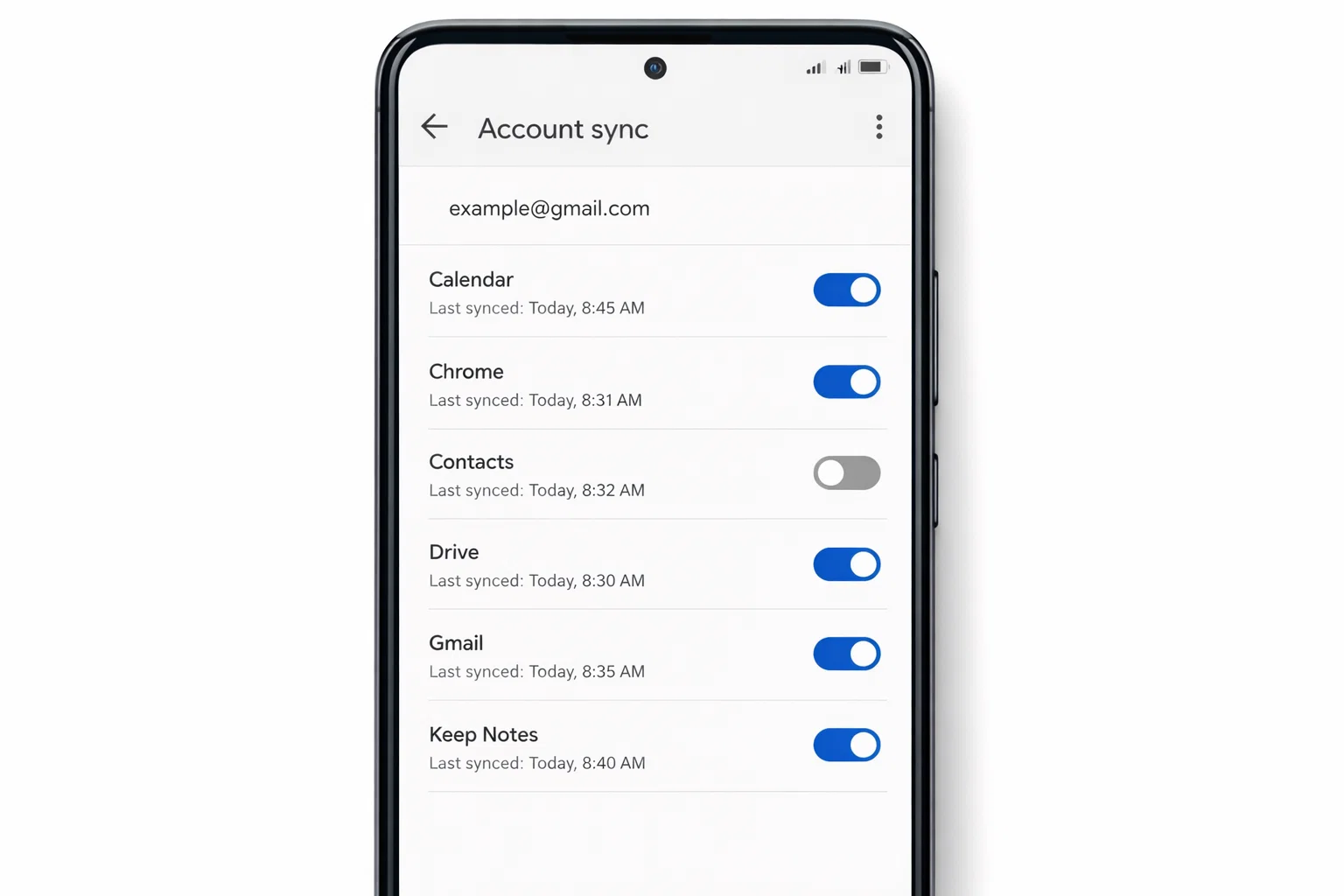
 If your Android phone is showing hundreds of contacts you never saved, don’t worry. I’ve tested the latest Android 14 and 15 updates in 2026, and yes you can safely remove Gmail sync contacts from Android phone without deleting everything.
Here’s the quick answer:
To remove Gmail synced contacts, go to Settings → Passwords & Accounts → Google → Turn off “Contacts” sync.
Or remove the Google account from your phone if you don’t want syncing at all.
That’s the short version. Now let me walk you through the clean, safe way especially if your WhatsApp is also showing unwanted Gmail contacts.
Why Are Gmail Contacts Showing on My Android Phone?
When you sign in with your Gmail account, Android automatically turns on contact sync.
That means:
- Any contact saved in Gmail appears on your phone.
- Any contact saved on your phone gets uploaded to Gmail.
- Apps like WhatsApp also show those synced contacts.
If you once imported contacts from another device, used an old SIM, or logged into multiple Gmail accounts boom your phone gets crowded.
Let’s fix it properly.
How Do I Remove Gmail Synced Contacts from Android? (Latest 2026 Method)
Here’s the safest method that works on Samsung, Vivo, Oppo, Xiaomi, Infinix, Tecno, Realme basically all Android devices.
Method 1: Turn Off Gmail Contact Sync Only
This keeps your Gmail account but stops contacts syncing.
- Open Settings
- Tap Passwords & Accounts (or Accounts & Backup)
- Select your Google account
- Tap Account sync
- Turn OFF Contacts
Done.
Now wait 1–2 minutes. Your phone will stop syncing Gmail contacts.
But if contacts are still visible, continue below.
Method 2: Hide Gmail Contacts from Contact App
Sometimes contacts remain visible even after sync is off.
Do this:
- Open the Contacts app
- Tap the 3-dot menu
- Go to Manage contacts
- Tap Contacts to display
- Select Phone only
Now your phone will show only locally saved contacts.
This is perfect if you want to keep Gmail but not see those contacts.
How Do I Delete Gmail Contacts from My Android Phone?
Important: If you delete a synced contact directly from your phone, it also deletes from Gmail permanently.
If that’s what you want, here’s how:
- Open Contacts app
- Select the Gmail contact
- Tap Delete
- Confirm
Or delete them from Gmail website:
- Go to contacts.google.com
- Select contacts
- Click Delete
This removes them everywhere.
How to Remove Gmail Sync Contacts from WhatsApp?
This is where most people get frustrated.
You remove contacts from phone, but WhatsApp still shows them.
Here’s why:
WhatsApp reads all contacts stored in your phone memory including synced Gmail ones.
To fix it:
- Remove or hide Gmail contacts using steps above
- Open WhatsApp
- Go to Settings → Privacy → Contacts
- Turn off and on contact permission
- Restart your phone
Now open WhatsApp and refresh contacts.
That usually solves it.
If not, clear WhatsApp cache:
Settings → Apps → WhatsApp → Storage → Clear Cache
Do NOT clear data unless necessary.
How Do I Delete Linked Contacts on Android?
Linked contacts happen when:
- Same number exists in Gmail and SIM
- Same person saved twice
To unlink:
- Open Contacts
- Open the linked contact
- Tap View linked contacts
- Select Unlink
Simple.
If duplicates are too many, use:
Contacts → Fix & Manage → Merge & Fix
Android now auto-detects duplicates in 2026 versions.
What Happens If I Remove Google Account Completely?
If you remove the Gmail account from your Android phone:
- Gmail app signs out
- Google Play Store signs out
- All synced contacts disappear
- Google Photos sync stops
To remove:
Settings → Passwords & Accounts → Google → Remove Account
Only do this if you’re sure.
Quick Comparison Table
| Action | What Happens | Safe? |
|---|---|---|
| Turn off contact sync | Stops new syncing | ✅ Yes |
| Hide Gmail contacts | Only shows phone contacts | ✅ Yes |
| Delete Gmail contacts | Removes permanently | ⚠️ Careful |
| Remove Google account | Removes everything | ⚠️ Advanced |
Common Mistake People Make
They delete contacts directly without turning off sync first.
Result?
Contacts come back again.
Always turn off sync first. Then manage contacts.
Real Example
One reader from Lahore messaged me last week. He logged into his old Gmail on a new Infinix phone. Suddenly, 800 old business contacts appeared in WhatsApp.
He thought his phone was hacked.
It wasn’t.
Just Gmail sync.
We turned off contact sync and set Contacts to “Phone Only.” Problem solved in 2 minutes.
Does This Work on Android 14 and Android 15?
Yes.
Tested in 2026 on:
- Samsung One UI 6
- Xiaomi HyperOS
- Realme UI
- Infinix XOS
- Stock Android
Menu names may slightly change, but the path is similar.
Final Thoughts
If you’re wondering how to remove Gmail sync contacts from Android phone, the safest way is:
Turn off contact sync → Hide Gmail contacts → Refresh WhatsApp.
Simple.
No need to reset phone. No need to delete everything.
Just control the sync.

Muhammad Nawaz, tech guru & gaming aficionado. Your go-to for mobile news, gaming updates & expert blogging tips.