Stop Losing Balance on Ufone!
Are you tired of opening your Ufone app only to see your balance mysteriously disappear? 😟 You’re not alone. Many users lose their mobile credit due to background app usage, expired internet bundles, or unknown deductions.
But here’s the good news: Ufone Save Balance Service is the free solution you’ve been waiting for! 💡
With a simple USSD code, you can lock your Ufone balance and say goodbye to unexpected charges.
In this guide, we’ll walk you through:
- How to activate and deactivate the service
- What the *6611# code does
- What to do if it doesn’t work
- And other tips to stop balance loss
Let’s save that balance, shall we? 💰📱
🛡️ What Is Ufone Save Balance Service?
Ufone Save Balance Service (also called Ufone Balance Lock Code) is a simple USSD-based feature that prevents your balance from being used automatically — especially when your internet bundle expires or background apps consume data unknowingly.
It’s a free feature, and all you need is a few seconds to activate it.
Main Function: Stops background internet usage from deducting your main balance.
✳️ Key Benefits:
- ✅ Free of cost
- ✅ Protects against automatic data charges
- ✅ Works with all prepaid Ufone SIMs
- ✅ Quick activation with a USSD code
📲 How to Activate Balance Saver in Ufone?
You can subscribe to Ufone’s balance lock feature using just your keypad — no app or internet required.
🧾 Steps to Activate:
- Dial
*6611#from your Ufone SIM - A menu will appear on your screen
- Press 1 to Subscribe
- You’ll get a confirmation SMS in seconds!
🔁 Reactivation Tip: Some users report that the feature may deactivate after changing bundles. Always check your status after purchasing a new internet package.
❌ How to Deactivate (Unsubscribe) Balance Lock Service?
Want to turn off the Ufone Balance Save feature? Here’s how:
🚫 To Unsubscribe:
- Dial
*6611#again - Select option 2 to Unsubscribe
- Wait for the confirmation SMS
Whether you’re switching to a new bundle or facing network issues, you can toggle the service on/off anytime.
🧪 Troubleshooting: *6611# Not Working?
Sometimes the USSD code might not respond.
Here’s what to try:
- 📶 Move to an area with stronger network signal
- ⏱ Wait a few minutes and try again
- 📞 Call 333 (Ufone Helpline) and ask for assistance
- 🆕 Try restarting your phone and dialing again
📱 UPTCL (My Ufone App) – Can You Use It to Activate Save Balance?
We personally checked the latest version of the Ufone app (UPTCL).
❌ Verdict: UPTCL app does not have this feature (as of 2026)
So the best and most reliable way to lock your Ufone balance remains the USSD Code: *6611#

⚠️ What Is *4466 Offer in Ufone?
Some users confuse *4466# with *6611#.
Let’s clarify:
| Code | Function |
|---|---|
*6611# | Ufone Save Balance Service (Balance Lock) |
*4466# | Ufone All-in-One Bundles (Hybrid Offers) |
*5353# | Ufone Internet Packages Menu |
*706# | Check Remaining Resources (MBs, SMS, Min) |
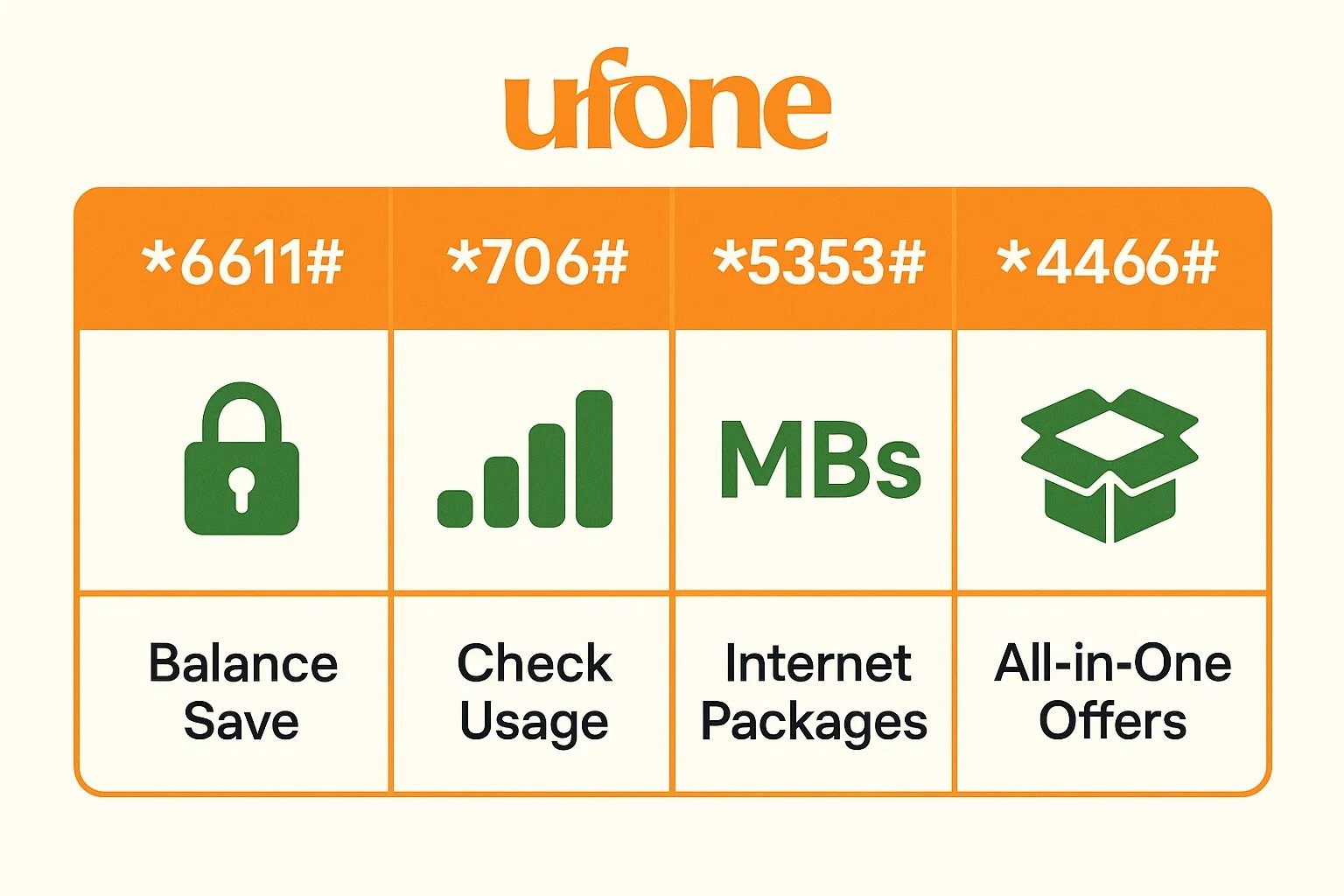
💡 Always double-check before dialing a code. Each code does something different!
💡 Why You Should Activate Ufone Balance Save
Still wondering if it’s worth it?
Here’s why this free service is a smart choice:
🔐 Prevent Unwanted Deductions:
Stop losing Rs. 10, Rs. 50, or even Rs. 100 when your internet bundle finishes.
💸 No Extra Cost:
Unlike other services, this one is 100% free. No hidden charges, no subscriptions.
✨ Simple to Manage:
You don’t need an app, internet, or even a smartphone. Just a basic keypad phone is enough!
📵 Extra Tips to Save Your Ufone Balance
Besides using *6611#, here are other smart tips:
- 🔌 Turn off mobile data when not in use
- 🧾 *Dial 706# often to check MBs, Minutes, and SMS balance
- 🛑 Block Value-Added Services (VAS):
- Call 333 and request to deactivate any premium charges
- 📉 Avoid unknown offers with auto-renew settings
- 🚫 Don’t click on random pop-up ads or allow background data on social media apps
💬 Quick FAQs: Ufone Balance Save Code
❓Q1: How to Save Ufone Balance?
✅ Dial *6611# and select option 1 to subscribe
❓Q2: What Does Balance Saver Code Do?
It blocks unintended data usage (especially when your bundle expires) but does not stop:
- Active bundle renewals
- Premium SMS subscriptions
- Manual app downloads
❓Q3: Do I Have to Reactivate the Code After Buying a New Bundle?
Yes, in many cases, balance save gets deactivated after buying a new package. So always dial *6611# again to re-subscribe.
❓Q4: Will Locking My Balance Stop My Internet or Calls?
No! You can:
- Still use your active internet bundle (MBs)
- Make calls or send SMS as usual
- Only default data charges are blocked
❓Q5: What If My Balance Is Still Deducted?
Try these steps:
- Check if you’ve really activated the service via *6611#
- Call Ufone helpline 333
- Ask to disable any unknown services
- Turn off mobile data manually when not needed

Muhammad Nawaz, tech guru & gaming aficionado. Your go-to for mobile news, gaming updates & expert blogging tips.